
Finding the best budget office chairs is not simply about choosing the lowest-priced model. A chair can look attractive and affordable, yet still be a poor fit for your body or workspace.
A better approach is to look at the features that affect everyday comfort and support. Adjustable seat height, suitable seat dimensions, lumbar support, a supportive backrest, useful armrests, and a stable base are all important considerations when evaluating an office chair. OSHA recommends choosing a chair that can be adjusted to fit the user and then adjusting it together with the rest of the workstation.
Whether you work from home, study, or spend much of your day at a computer, the right budget chair should complement your desk and allow you to create a comfortable workstation without paying for unnecessary features.
What Makes the Best Budget Office Chairs?
The best budget office chairs combine a reasonable price with features that genuinely improve fit and usability. There is no single chair that suits every person because body dimensions, desk height, working habits, and personal preferences vary.
OSHA recommends considering the chair’s seat, backrest, armrests, and base, while also emphasizing adjustability and individual fit. Trying a chair before buying it, when possible, can therefore be useful.
Comfort and Seat Support
The seat should provide enough support for your thighs and allow you to sit without the front edge pressing against the backs of your knees.
Seat height is particularly important. OSHA recommends a height that allows the feet to rest fully on the floor, or on a stable footrest when the workstation cannot be adjusted appropriately. Seat depth should also be suitable for the user so that the back can remain supported without the front edge putting pressure behind the knees.
When comparing affordable chairs, check the actual seat dimensions instead of relying only on product photographs. A chair that fits one person comfortably may feel completely different to someone with different proportions.
Lumbar Support and Ergonomic Design
Lumbar support refers to support for the lower part of the back. OSHA recommends a backrest that follows the natural curve of the spine and provides appropriate lumbar support. Adjustable lumbar support can make it easier to position the support where it is needed.
An ergonomic chair is not necessarily the chair with the most features. The more important question is whether the available adjustments allow the chair to fit the person using best budget office chairs. Cornell University also recommends considering adjustable height, seat-pan depth, lumbar support, armrest height, and a back that can be locked or adjusted.
Adjustability and Flexibility
Adjustability is one of the most useful characteristics to look for in the best budget office chairs. Depending on the model, useful adjustments can include seat height, seat depth, backrest position or recline, lumbar support, and armrest height.
Different people need different settings. A chair that works well for a taller person may not provide the same fit for a shorter user. OSHA’s guidance specifically highlights adjustability as a way to improve fit and accommodate different sitting positions.
Before paying extra for numerous controls, consider which adjustments you are actually likely to use.
Durability and Build Quality
Price alone does not tell you how well a chair will perform over time. When evaluating build quality, look at the manufacturer’s specifications for the base, casters, seat, backrest, adjustment mechanisms, and weight capacity.
OSHA’s purchasing guide recommends a sturdy five-legged base and casters that roll appropriately across the floor or carpet. Best budget office chairs also recommends seat and back materials that are firm, breathable, and resilient.
A sensible comparison should therefore consider construction and warranty information alongside the purchase price.
Best Budget Office Chairs for Different Needs
The right chair depends partly on how and where you use best budget office chairs. A student who studies for shorter periods may have different priorities from a remote worker who spends most of the working day at a computer.
Best Budget Office Chairs for Home Offices
A home-office chair needs to work with the desk, monitor, and available space in your room. Before choosing one, consider the height of your desk and how much room you have around it.
An adjustable chair can make best budget office chairs easier to position your body appropriately in relation to the workstation. OSHA recommends adjusting the chair along with the desk, keyboard, and monitor rather than treating the chair as an isolated component.
Best Budget Office Chairs for Remote Work
Remote workers often spend substantial time at a computer, making chair fit particularly important. Look for a model that allows you to adjust the seat height and provides suitable back support.
Your chair should also work with your monitor, keyboard, and desk. OSHA recommends arranging computer-workstation components to encourage neutral body positions rather than forcing the user to lean, twist, or reach unnecessarily.
Best Budget Office Chairs for Students
Students may use their chair for writing, reading, studying, and computer work. A practical choice should therefore fit the student’s desk and provide appropriate support without taking up unnecessary space.
Adjustable height, suitable seat dimensions, a supportive backrest, and a stable base are useful features to consider. If the chair must be raised to match a fixed desk and the feet no longer reach the floor, OSHA recommends using a stable footrest when appropriate.
Best Budget Office Chairs for Long Work Hours
If you regularly spend many hours at a desk, comfort should not be judged by cushioning alone. The chair should fit your body, support your back, and allow appropriate adjustment.
Best budget office chairs is also important not to remain completely still for long periods. OSHA recommends changing working positions, making small chair or backrest adjustments, and periodically standing or walking.
Key Features to Look for in Budget Office Chairs
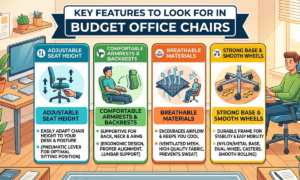
When comparing the best budget office chairs, concentrate on features that affect fit, support, and everyday usability.
Adjustable Seat Height
Seat-height adjustment allows you to position the chair in relation to your desk. OSHA recommends a setup where the feet are fully supported by the floor or by a stable footrest when necessary.
The correct setting is not identical for everyone. Your height and the height of your desk both affect the appropriate chair position.
Comfortable Armrests and Backrests
Armrests can provide support for the forearms when positioned correctly. OSHA recommends armrests that allow the shoulders to remain relaxed and the elbows to stay close to the body. They should not prevent the chair from moving close enough to the workstation.
The backrest should support the back and provide appropriate lumbar support. Adjustable backrests can also give users more flexibility when changing between upright and slightly reclined positions.
Breathable Materials
The materials used on the seat and back can affect how the chair feels during regular use. OSHA’s purchasing guidance recommends seat and back materials that are firm, breathable, and resilient.
Rather than assuming that one material is automatically best, consider the chair’s construction, the environment in which you work, and your own comfort preferences.
Strong Base and Smooth Wheels
A stable base is an important part of an office chair. OSHA recommends a sturdy five-legged base with casters that roll properly over the relevant floor or carpet surface.
Also check whether the casters are appropriate for your flooring. A chair that moves smoothly can make it easier to access nearby areas of your workstation without repeatedly twisting or reaching.
How to Choose the Best Budget Office Chair
Choosing the best budget office chair becomes easier when you begin with your own needs rather than choosing a model simply because it has a popular design.
Consider Your Daily Sitting Time
Think about how you will use the chair. A person who sits for short study sessions may have different requirements from someone who works at a computer throughout the day.
For longer periods of computer work, pay particular attention to adjustability, seat dimensions, back support, and your ability to change position. OSHA recommends varying posture and activity rather than remaining in one position for prolonged periods.
Check Chair Size and Weight Capacity
Chair dimensions should match the person using best budget office chairs. Seat width should provide sufficient room, while seat depth should support the thighs without pressing against the backs of the knees.
OSHA specifically recommends selecting seat width and depth according to the individual user. Its purchasing guidance also notes that chairs should be selected to support the user’s weight requirements. Always check the manufacturer’s stated weight capacity instead of assuming that every office chair has the same rating.
Compare Comfort and Features
A chair does not become better simply because best budget office chairs has more adjustment controls. Focus on the features that solve your particular needs.
For example, adjustable height may be essential for matching your desk, while adjustable lumbar support may be particularly useful if you need more control over lower-back support. OSHA’s purchasing checklist includes seat dimensions, back support, armrests, adjustability, and base construction among the factors worth evaluating.
Read Reviews Before Buying
Customer reviews can provide practical information about assembly, adjustment controls, comfort, and everyday use. They can be useful when product specifications do not tell the whole story.
However, reviews should not replace checking the manufacturer’s specifications. Compare multiple reviews and verify important details such as dimensions, weight capacity, warranty, and return terms before purchasing.
Best Budget Office Chairs for Comfort and Productivity
A chair is only one part of a productive workstation. The way the chair interacts with the desk, monitor, keyboard, and other equipment also matters.
How a Comfortable Chair Supports Productivity
OSHA describes a well-designed and appropriately adjusted chair as an important part of a safe and productive computer workstation. A suitable chair can support the back, legs, buttocks, and arms while helping reduce awkward working positions.
This does not mean that buying an expensive chair automatically makes you more productive. The practical goal is to create a workstation that allows you to work comfortably and adjust your position when needed.
Why Proper Sitting Support Matters
A chair that does not fit properly can make best budget office chairs harder to maintain a comfortable working position. For example, OSHA notes that an unsuitable seat height can leave the feet unsupported, while an inappropriate seat depth can interfere with back support. Proper support therefore starts with choosing the right size and then adjusting the chair to your body and workstation.
Creating a Comfortable Office Setup
Even the best budget office chairs cannot compensate for every workstation problem. Your monitor, keyboard, mouse, desk, and chair should be considered together.
OSHA recommends arranging workstation components to promote neutral body positions. Feet should be supported, the back should receive appropriate lumbar support, and the head and neck should remain reasonably aligned with the torso.
Common Mistakes When Buying Budget Office Chairs
Budget shopping can become expensive if you focus only on the initial price and overlook whether the chair actually fits your needs.
Choosing Price Over Quality
The lowest-priced chair is not automatically the best value. If best budget office chairs lacks important adjustments or is poorly suited to your body and desk, saving money at checkout may not result in the most useful purchase.
Compare the chair’s construction, dimensions, support, adjustment range, warranty, and return policy rather than looking at price alone.
Ignoring Ergonomic Features
A chair can look impressive while still lacking useful ergonomic adjustments. Ignoring features such as seat-height adjustment, lumbar support, or appropriate armrests can make it harder to create a comfortable workstation.
OSHA’s chair evaluation guidance specifically identifies adjustable seat height, suitable seat dimensions, lumbar support, and adjustable armrests as factors to consider.
Buying the Wrong Size
Chair dimensions are easy to overlook when shopping online. Before buying, compare the manufacturer’s measurements with your own requirements. A seat that is too deep can make best budget office chairs difficult for a shorter user to sit with their back against the backrest, while a seat that is too short may not provide enough thigh support.
Overlooking Warranty and Return Policies
A return policy can be particularly useful when purchasing a chair online because you may not be able to test its fit beforehand.
Check the actual terms before ordering, including the return period, conditions, shipping requirements, and warranty coverage. Do not assume that every chair or seller offers the same protection.
Read more : What Is a Draconian Card? Everything You Need to Know
How to Maintain a Budget Office Chair
Good maintenance is a simple part of getting continued use from an office chair. The manufacturer’s instructions should always take priority because cleaning and maintenance requirements vary between models.
Clean the Chair Regularly
Clean the seat, backrest, armrests, and other surfaces according to the manufacturer’s care instructions. Avoid using cleaning products that are not recommended for the chair’s particular materials. Regular cleaning can also give you an opportunity to notice damage, loose components, or unusual wear.
Check Wheels and Moving Parts
Periodically inspect the casters, base, adjustment controls, and other moving components. The chair should remain stable and its wheels should move as intended.
If a part becomes damaged, check the manufacturer’s instructions before attempting a repair or replacement.
Adjust and Tighten Loose Components
Check screws, bolts, and other components as recommended by the manufacturer. If something becomes loose, follow the manufacturer’s maintenance instructions rather than making modifications that could affect the chair’s stability.
Keeping workstation equipment in proper working condition is consistent with OSHA’s workstation evaluation approach.
Final Thoughts on the Best Budget Office Chairs
The best budget office chairs are not necessarily the cheapest chairs or the models with the longest list of features. The better choice is the chair that fits your body, works with your desk, provides appropriate support, and offers adjustments that are useful to you.
Before buying, compare seat dimensions, height adjustment, lumbar support, backrest design, armrests, materials, base construction, weight capacity, warranty, and return policies. These details can tell you much more about a chair’s suitability than its appearance or marketing claims.
It is also worth remembering that a chair is part of a complete workstation. Adjusting the chair together with your desk, monitor, keyboard, and other equipment can help create a more comfortable working position. OSHA also recommends changing positions throughout the day instead of remaining completely still for prolonged periods.
FAQs About Budget Office Chairs
What Is a Good Price for a Budget Office Chair?
There is no single price that defines a good budget office chair. A better way to judge value is to compare the price with the chair’s dimensions, adjustability, support, construction, warranty, and intended use.
Are Budget Office Chairs Comfortable for Long Hours?
Some budget chairs can provide comfortable support for extended computer work, but comfort depends on the individual and how well the chair fits.
What Features Should a Budget Office Chair Have?
Useful features can include adjustable seat height, suitable seat depth and width, lumbar support, a supportive backrest, appropriate armrests, and a sturdy base with suitable casters.
How Long Do Budget Office Chairs Usually Last?
There is no single lifespan that accurately applies to every budget office chair. Longevity depends on factors such as construction, materials, frequency of use, user weight, maintenance, and the quality of individual components.
Is an Ergonomic Office Chair Worth the Extra Cost?
An ergonomic chair can be worth paying more for when the additional cost provides adjustments that help you achieve a better fit. Cornell University recommends looking for features such as adjustable height, seat-pan depth, lumbar support, armrest height, and an adjustable or lockable back.